Building Rena — An AI Health Companion with Gemini Live, Veo 2, and Google ADK
I built Rena for the Gemini Live Agent Challenge 2026 — a personal AI health companion where you never have to open a logging screen. You just talk.
Try it: rena-490107-f0f28.web.app · Code: github.com/aag1091-alt/Rena
The idea
Most health apps fail because tracking is a chore. You have to open the app, find the right screen, tap in numbers — dozens of times a day. Rena flips this with voice-first interaction powered by Gemini Live:
- “I had salmon, rice, and sparkling water for lunch”
- “Add bodyweight squats to my workout plan”
- “Plan my meals for tomorrow — I have a long run in the morning”
Rena listens, understands, and acts. The app also starts with one question: “What are you working toward?” You tell her in your own words — “I want to feel confident at my friend’s wedding in July”, “Beach trip in 10 weeks” — and every recommendation she makes is filtered through that specific goal, not a generic calorie number.
The app
Four tabs, each with a dedicated voice context:
- Home — goal countdown, daily calorie breakdown, protein/water progress, AI morning insight
- History — scrollable day log with macros, workouts, and a Gemini-generated daily insight
- Plan — workout plan + meal plan, generated through voice conversation with Rena
- Scan — camera or gallery scan; Rena identifies food and estimates calories per item
Technologies
AI & ML
| Technology | How it’s used |
|---|---|
| Gemini Live API | Real-time bidirectional voice — the core of all voice interaction |
Gemini 2.5 Flash (gemini-2.5-flash-native-audio-latest) |
Agent reasoning, plan generation, day insights, coaching scripts |
| Gemini Flash Vision | Food photo recognition — identifies items, returns nutrition estimates |
| Veo 2 | AI-generated exercise demonstration videos |
| Imagen | Vision board image generation on goal setup |
| Google ADK | Agent framework — tools, routing, session management |
Google Cloud TTS (en-US-Neural2-F) |
Rena’s coaching voiceover for exercise videos |
Infrastructure
| Service | Role |
|---|---|
| Cloud Run | Hosts the Rena agent (min 1 instance — no cold-start voice drops) |
| Firestore | All user data — logs, plans, goals, prompts, insights, video jobs |
| Cloud Storage | Exercise videos + vision board images |
| Firebase Hosting | PWA web companion |
| Cloud Build | CI/CD — GitHub push triggers build + deploy |
Application stack
- iOS: SwiftUI, AVAudioEngine, URLSessionWebSocketTask
- Web PWA: Vanilla JS, Web Audio API + AudioWorklet, WebSocket, Service Worker
- Backend: Python, FastAPI, Google ADK
Architecture
┌──────────────────────────────────────────────────────────────────┐
│                     iOS App / Web PWA                            │
│  Home  │  History  │  Plan (Workout + Meals)  │  Scan/Camera    │
└──────┬──────────────────────────────────────────────────────────-┘
       │ WebSocket (audio) + REST (data)
┌──────▼───────────────────────────────────────────────────────────┐
│                    Rena Agent (Cloud Run)                         │
│                                                                   │
│  Google ADK — Agent Core                                          │
│  • log_meal / log_water / log_workout / log_weight               │
│  • scan_image                                                     │
│  • generate_workout_plan / generate_meal_plan                    │
│  • save_tomorrow_plan_note / get_recent_workouts                 │
│                                                                   │
│  Context prompt system                                            │
│  • Prompts in Firestore — live-editable, no redeploy             │
│  • [RENA MEMORY] block injected at every session start           │
│  • Per-tab contexts: home, history, scan, plan, goal             │
│  • tool_status WS messages → live save indicators                │
└──────────────────────┬───────────────────────────────────────────┘
                       │
       ┌───────────────┼────────────────────┐
       ▼               ▼                    ▼
  Firestore      Gemini APIs          Cloud Storage
  (all data)     Live · Flash         exercise_videos/
                 Vision · Veo 2       vision_journey/
                 Imagen · TTS
Voice session data flow:
User taps Rena →
WebSocket /ws/{user_id}?context={tab}&tz={timezone} →
Backend fetches [RENA MEMORY] + prompt →
PCM audio (16 kHz) streamed over WebSocket →
ADK → Gemini Live → intent → tool called →
tool_status message → live save indicator shown →
Tool writes to Firestore →
Audio chunks (24 kHz) streamed back → played via AVAudioEngine
The exercise video pipeline
One of the more ambitious features: AI-generated coaching videos for workout exercises, generated on demand and cached forever.
1. Gemini 2.5 Flash writes a coaching script
   (setup cues, movement feel, breath, safety — BLOCK_NONE filters
    so anatomical terms pass through)

2. Random trainer gender picked for visual variety

3. Veo 2 job submitted with exercise + muscles + script as direction
   "No text, subtitles, captions or overlays on screen"
   → returns job_id immediately; stored in Firestore

4. iOS/web polls every 5s for status

5. Google Cloud TTS (en-US-Neural2-F) generates coaching voiceover
   We tried matching a separate trainer voice to the video — the timing
   never lined up. The fix: use Rena's own voice throughout.
   Same voice the user has been talking to all along.

6. ffmpeg muxes Veo video + TTS audio into a single .mp4

7. Uploaded to GCS — same exercise never regenerates

8. AVQueuePlayer + AVPlayerLooper plays seamlessly on iOS
Exercises with AI-generated videos available today: Bodyweight Squats, Plank, Walking Lunges, Elliptical Trainer.
Key challenges
1. Getting Gemini Live to behave inside ADK
The hardest part was making the voice agent reliable rather than just impressive in a demo. Gemini Live tends to interrupt itself, end turns prematurely, or stop responding after tool calls.
The solution was treating prompts like software — versioned, tested, iterated. Every context (home logging, plan generation, history editing, scan) has its own system prompt stored in Firestore. Live-editable without a redeploy, meaning prompt changes could be tested in the running app within seconds.
Key prompt techniques:
[RENA MEMORY]block injected at session start — goal, today’s calories, recent meals, workouts, weight trend — so Rena never has to ask what you’ve already told her- Explicit post-tool-call instructions: “after saving, tell the user what you logged in one sentence and wait”
thinking_budget=0via a monkey-patch onGemini.connect()— ADK’s standard config path silently droppedthinking_configbefore it reached the Live API
2. Real-time save indicators
When Rena calls a tool there’s a gap — the user doesn’t know if something is happening or if the session stalled. Before each tool runs, the backend sends {"type": "tool_status", "message": "Logging your meal…"} over the WebSocket. The voice overlay immediately updates in real time — users see “Building your workout plan…” instead of silence.
3. iOS audio engine continuity
AVAudioEngine is notoriously fragile — audio interruptions can destroy it, and restarting introduces latency. We keep the engine running continuously between sessions, routing PCM frames through an AVAudioMixerNode tap rather than restarting on every session open.
4. Veo 2 audio matching
First approach: record a trainer’s voice reading the coaching script and mux with the Veo video. The timing never matched — the trainer audio was recorded independently of how the generated video moved.
Fix: use Rena’s own TTS voice (en-US-Neural2-F) for the coaching audio. Unexpected upside — users are already familiar with Rena’s voice, so hearing her coach them through an exercise feels natural and consistent.
5. Timezone-aware context
“What did I eat today?” is hard when users are in different timezones and the server runs in UTC. We added tz to the WebSocket URL, cached it per session, and inject [CURRENT_LOCAL_TIME] into every prompt so Rena always knows the user’s local date.
6. Prompt iteration speed
8+ contexts required dozens of prompt iterations each. The Firestore-backed system meant zero redeploys. A seed_prompts.py script keeps prompts in version control and syncs to Firestore on demand.
Try it yourself
Web app (instant, no install): rena-490107-f0f28.web.app
- Open in Chrome or Safari on your phone
- Sign in with Google and complete the quick onboarding
- Tap ⚙ Settings → Seed 7 Days Data to pre-populate with realistic history
- Tap the Rena orb (center tab), allow microphone, and start talking
The web app is optimised for mobile screen sizes. If you’re on desktop, open DevTools and switch to iPhone view.
iOS app: Clone github.com/aag1091-alt/Rena, open ios/Rena/Rena.xcodeproj in Xcode, run on a physical iPhone. The app connects to the live Cloud Run backend — no local server needed.
What’s next
- Push notifications for morning nudges
- Gallery scan — Rena proactively finds food photos you already took
- Pattern filling — if nothing is logged by noon, Rena asks about your usual routine
- Streak milestones with Imagen-evolved vision boards
- watchOS for passive tracking
App screenshots
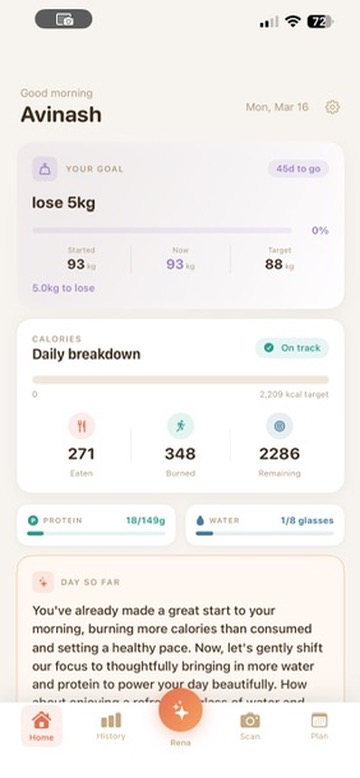
Home
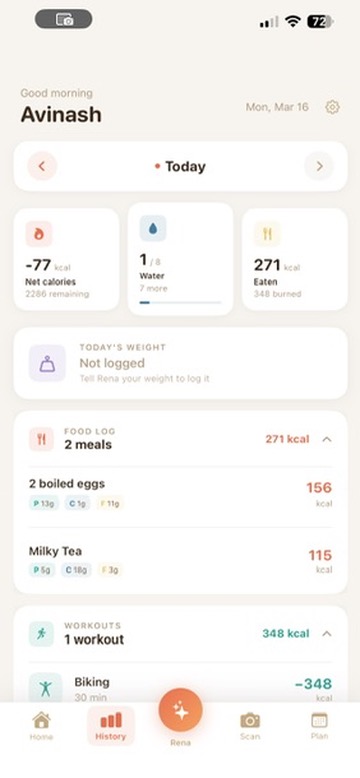
History
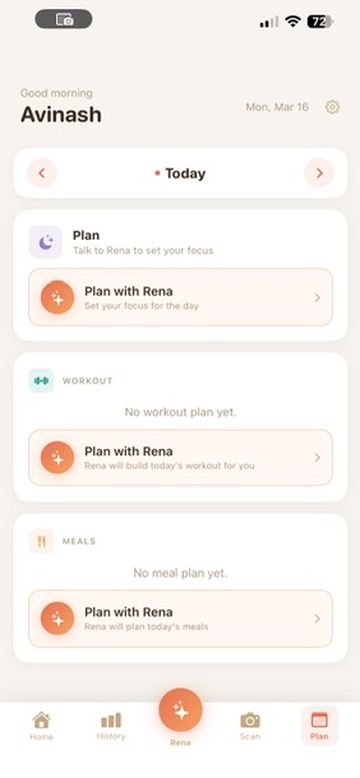
Plan
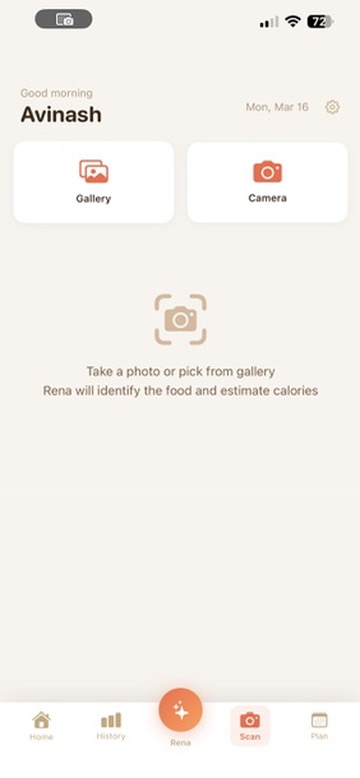
Scan
Built with Google Cloud, Gemini Live API, Veo 2, Imagen, and Google ADK for the Gemini Live Agent Challenge 2026.